
Print Watermark Overview
xSecuritas Print Watermark is an enterprise print watermark and print security solution that automatically inserts visible watermarks into printed documents, controls printing based on policy and Microsoft Sensitivity Labels, and helps organizations prevent document leakage and track print activity.
This enterprise-grade print security solution prevents document leakage by automatically inserting
visible watermarks into printed output. These watermarks can include user ID, IP address,
MAC address, date/time, printer name, process name, Active Directory information, and Microsoft
Sensitivity Labels (Data Classification), allowing organizations to trace printed documents and identify
the source of unauthorized distribution.
Watermark and print control policies are managed through an intuitive web-based policy server where
administrators can configure detailed rules with ease. Watermarks can be applied conditionally based on
process name, website URL, sensitivity label, printer name, document location or user/group. Depending on
policy, printing can be allowed with watermark, allowed without watermark, or blocked entirely, and you
can implement both whitelist and blacklist-style controls.
All print logs – including user name, document name, printer, page count and policy result – can be
collected on the policy server for auditing and compliance reporting. xSecuritas products are already
used reliably by more than 350,000 users worldwide. Print Watermark is available as both cloud and
fully on-premise solutions; the on-premise edition does not require any Internet connection, making it
ideal for banks, governments, defense and other high-security environments. Please request a trial and
experience how xSecuritas Print Watermark strengthens enterprise print security.
How xSecuritas Print Watermark Enterprise Works
Secure Printing with Real-Time Watermark Enforcement
xSecuritas Print Watermark automatically inserts visible watermarks into printed documents the moment a print job is initiated. The watermark can include metadata such as user ID, IP/MAC address, date/time, printer name, printer process name, Active Directory info, and Microsoft Sensitivity Label
A centralized Policy Server (cloud or on-premise) allows administrators to define and enforce print policies. Administrators can set watermark rules by user, group, IP, printer name, application, website, document location or sensitivity label — enabling fine-grained control
Based on the policy, the system supports multiple modes
Print with watermark
Print without watermark (if allowed)
Block printing entirely (if policy says so)
Every print job is logged: user name, document name, printer, page count, policy result, timestamp — logs are stored on the Policy Server for auditing and compliance reporting
Watermark output supports text, images, QR codes; watermark appearance (color, transparency, position, rotation, repetition) is fully customizable
Because xSecuritas Print Watermark works at the system/printer-driver level, it supports any application or file type — there’s no need to modify individual documents or applications
The solution can run fully on-premises with no requirement for Internet connection — making it suitable for high-security environments (e.g. finance, government, defense)
Product Details
Policy Server window
You can create watermark policy and view printing logs on the policy server.
-
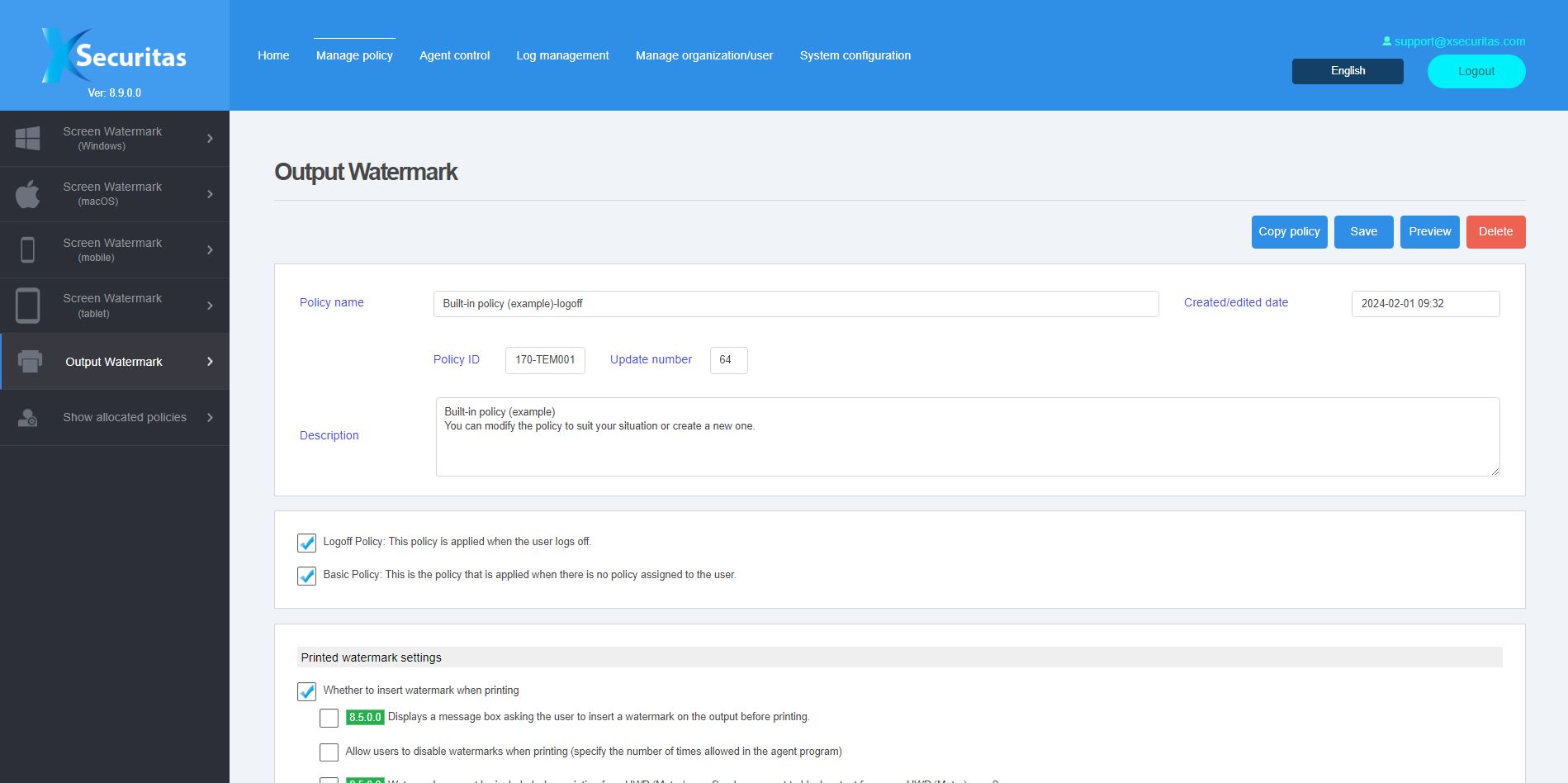
Watermark policy setting window -
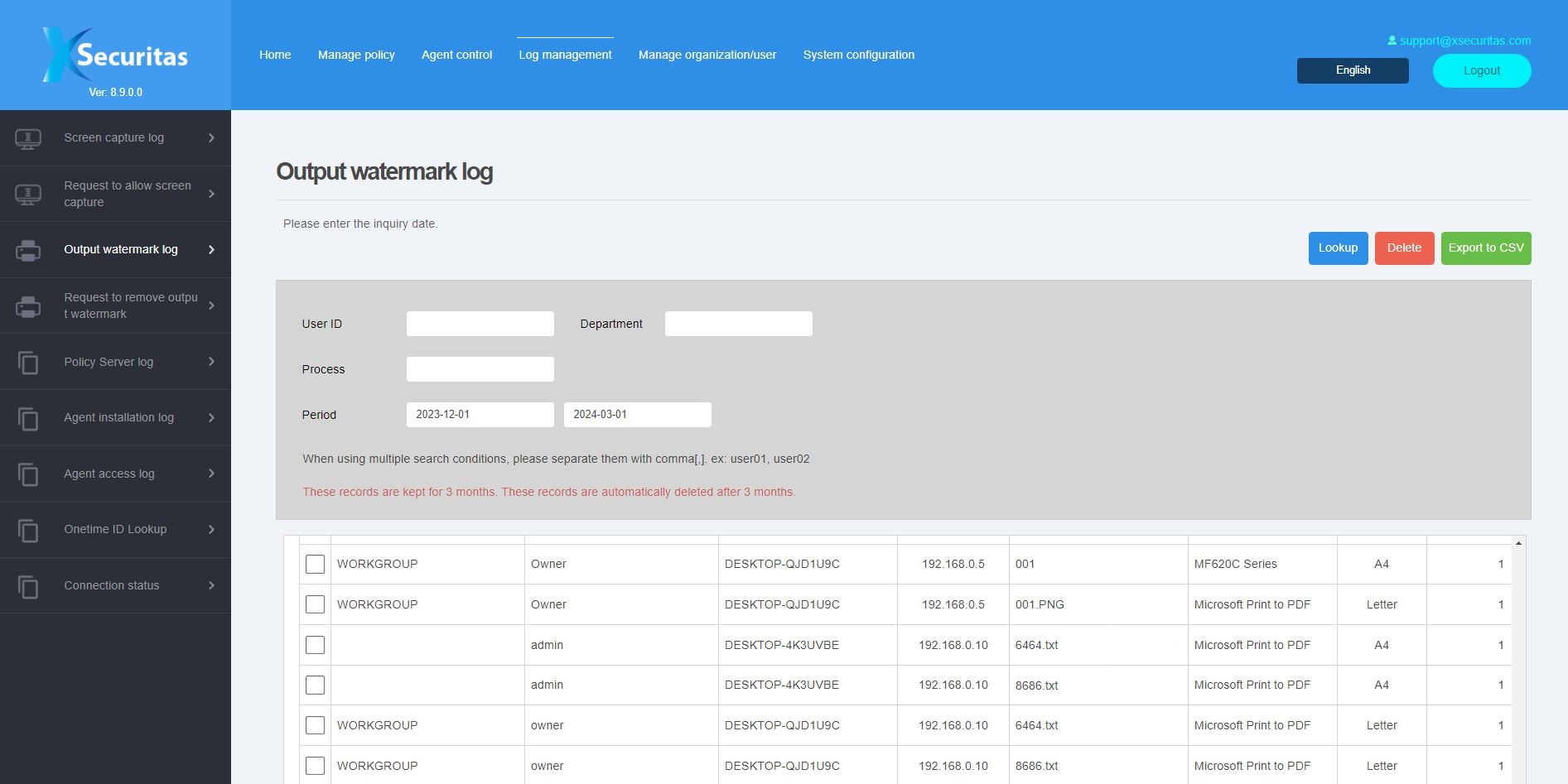
Print log window -
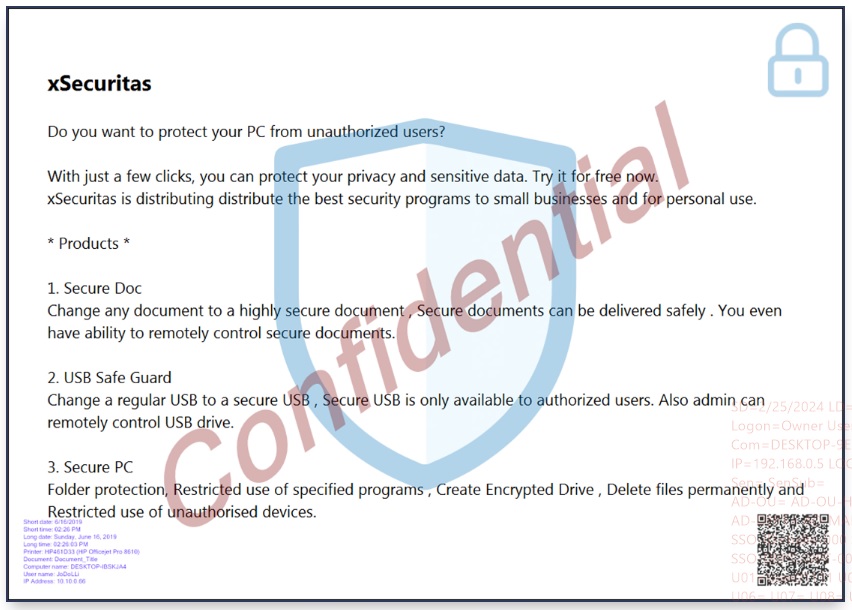
Watermark printing example
Provides various functions
-
Policy Server
We provide cloud or on-premises policy servers, and for on-premises, no internet connection is required.
In the policy server, you can create policies, control agents (quit agent/uninstall agent, etc.), and view logs.
The administrator creates watermark policies in order to be distributed to groups or users. You can create multiple watermark policies.
Policies can be assigned by user’s ID, IP-address, Active Directory security group, domain, and sub-domain.
You can apply the same policy to all users or assign each policy to each group or user.
Reservation policies are available.
Administrators can preview watermark policies before distributing them to users.
Save users' printing logs (recording user name, document name, printer, page count, etc.) to the policy server.
-
Specify watermark printing according to conditions
You can set whether or not to print the watermark depending on the specified program.
You can set whether or not to print the watermark depending on the specified web site.
You can set whether or not to print the watermark depending on the specified Microsoft Sensitivity label (Data Classification).
You can set whether or not to print the watermark depending on open documents in the specified folder.
You can set whether or not to print the watermark depending on the specified printer.
-
Whether to allow/block printing based on conditions
You can set whether to print or not according to the specified program.
You can set whether to print or not according to the specified web site.
You can set whether to print or not according to the specified Microsoft Sensitivity label (Data Classification).
You can set whether or print or not according to the open documents in the specified folder.
You can set whether to print or not according to the specified printer.
-
Supports various metadata watermarks
For a dynamic watermarking, we provide about 30 types of meta-text including user ID, local IP address, remote IP address, MAC, Active directory information, Microsoft Sensitivity Label (Data Classification), date time and computer environment.
Printing date, printer name, document name, etc. can be printed as a watermark.
You can register a unique key each time you print, and you can track documents with this unique key in the future.
Supports text, images, and QR codes as watermarks.
You can specify various colors, position, transparency, angle, and number of text repetitions for the watermark.
Supported OS
-
 Windows
Frequently Asked Questions about xSecuritas Print Watermark Enterprise
What is xSecuritas Print Watermark?
xSecuritas Print Watermark is an enterprise print security solution that automatically embeds visible watermarks into printed output to prevent document leakage, track printed documents, and enforce print policies.
What kind of metadata can be included in the watermark?
Watermarks can include user ID, IP/MAC address, printer name, document name, print date/time, Active Directory information, Microsoft Sensitivity Label (Data Classification), and more — with support for about 30 metadata types.
Can we control when watermark is applied or suppress watermark / block printing?
Yes. Using the Policy Server, administrators can define rules by user, group, IP, application, website, printer, document path, or sensitivity label. According to policy, printing can proceed with watermark, without watermark (if permitted), or be blocked entirely.
Are print jobs logged for audit and compliance?
Yes. Every print job is recorded: user name, document name, printer, page count, policy result, and timestamp. Logs are stored centrally for auditing and compliance reporting.
Does Print Watermark work for any application or file type?
Yes. Because watermarking is applied at the system/printer-driver level, it works regardless of which application or file type is being printed — no special modifications to applications or documents are required.
Can watermark appearance be customized?
Yes. Administrators can customize watermark content (text, image, QR code), appearance (color, transparency, position, rotation), and repetition count.
Is Print Watermark usable in high-security or offline environments?
Yes. The on-premise version does not require an Internet connection, making it suitable for high-security environments such as financial institutions, government, and defense.